MEETING PREP

Deep research

Portfolio Burn Analysis 6

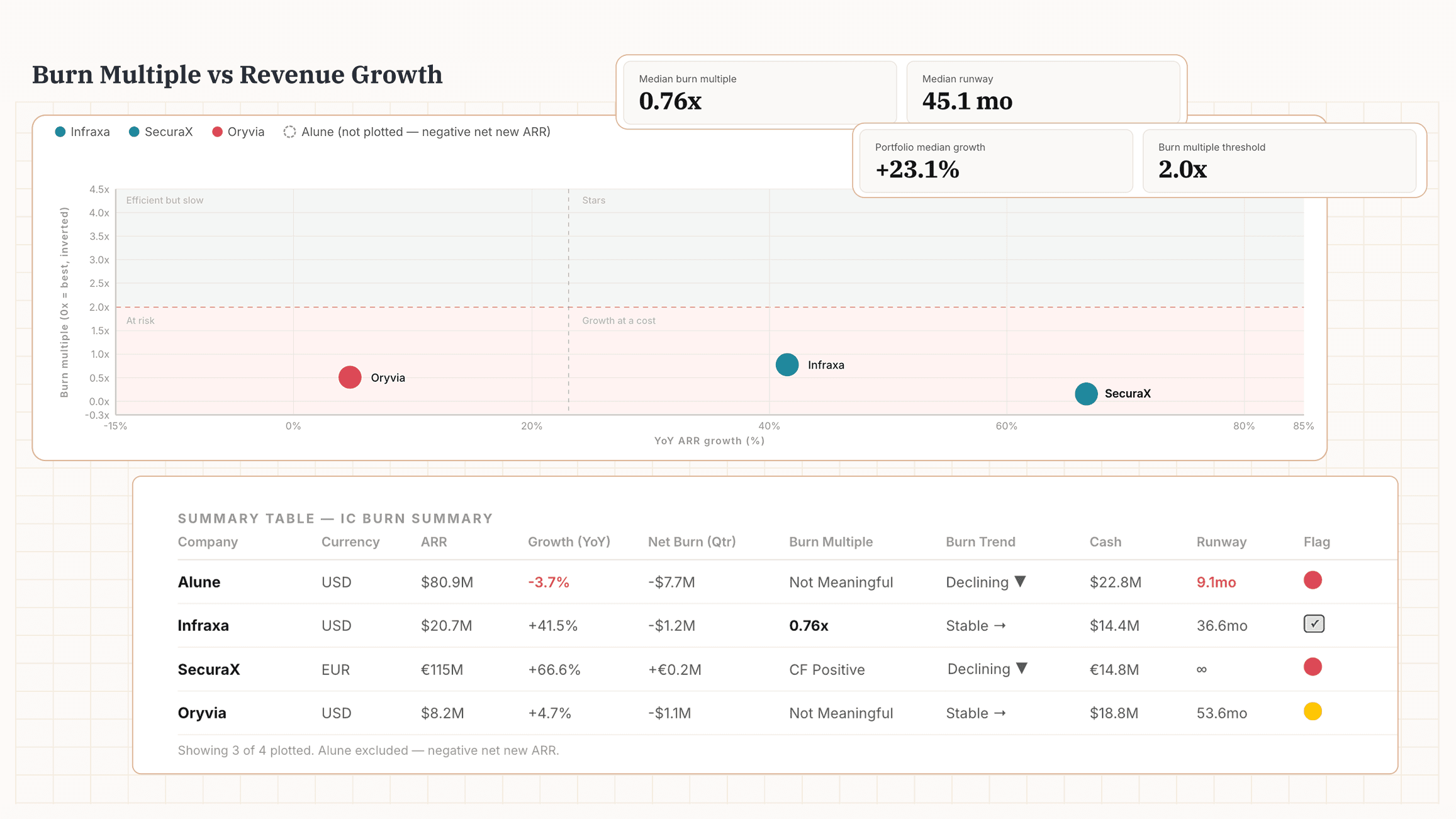
Burn multiple alone is only half the picture. Plot it against growth rate and you can see in one chart which portfolio companies are growing efficiently and which are burning faster than they're growing.
  1. Prepare your Data


Prepare a single spreadsheet — one row per company per quarter. This is the input file the AI needs to run the analysis. Add the following metrics for each company:

ARR or Revenue
Ending value for each quarter

Total OpEx & Revenue
To derive net burn if no direct figure

Cash in Bank
End-of-quarter balance

Include columns for company name, quarter, FY convention, currency. Note any fundraise amounts. Cover 4 quarters for QoQ, or include prior-year quarters for YoY. If a quarter is missing, leave the row blank.

Prompt

I'm running a quarterly portfolio burn analysis. I've uploaded a spreadsheet with quarterly ARR, operating expenses, revenue, and cash balance data for my portfolio companies. For each company: - Calculate net burn. Use a reported burn figure if present. Otherwise, calculate as Total OpEx minus Total Revenue and note that it's derived. - Calculate revenue growth rate. Use YoY if prior-year data exists, QoQ otherwise. Label which method. - Calculate burn multiple: net burn ÷ net new ARR for the most recent quarter. If net new ARR is zero or negative, mark as "Not Meaningful." - Calculate runway in months: ending cash balance ÷ average monthly burn over the last 2 quarters. If a fundraise amount is noted, exclude it from the burn calculation for that quarter. - Show the burn trend over the last 4 quarters: increasing, stable, or declining. Produce: - A summary table with: Company, Currency, ARR, Growth Rate, Net Burn, Burn Multiple, Burn Trend, Cash Balance, Runway, Flags. - A 2×2 scatter chart: X-axis = Growth Rate (%), Y-axis = Burn Multiple (inverted, 0x at top). Use portfolio median growth rate as the vertical reference line and 2.0x as the horizontal. Label quadrants: Stars, Efficient but Slow, Growth at a Cost, At Risk. Flag any company under 12 months of runway, burn multiple above 3x, or burn increasing for 2+ consecutive quarters. Include portfolio-level summary stats (median burn multiple, median runway) and highlight the top performer and any companies requiring immediate attention. Before calculating, confirm the fiscal year convention per company.

I'm running a quarterly portfolio burn analysis. I've uploaded a spreadsheet with quarterly ARR, operating expenses, revenue, and cash balance data for my portfolio companies. For each company: - Calculate net burn. Use a reported burn figure if present. Otherwise, calculate as Total OpEx minus Total Revenue and note that it's derived. - Calculate revenue growth rate. Use YoY if prior-year data exists, QoQ otherwise. Label which method. - Calculate burn multiple: net burn ÷ net new ARR for the most recent quarter. If net new ARR is zero or negative, mark as "Not Meaningful." - Calculate runway in months: ending cash balance ÷ average monthly burn over the last 2 quarters. If a fundraise amount is noted, exclude it from the burn calculation for that quarter. - Show the burn trend over the last 4 quarters: increasing, stable, or declining. Produce: - A summary table with: Company, Currency, ARR, Growth Rate, Net Burn, Burn Multiple, Burn Trend, Cash Balance, Runway, Flags. - A 2×2 scatter chart: X-axis = Growth Rate (%), Y-axis = Burn Multiple (inverted, 0x at top). Use portfolio median growth rate as the vertical reference line and 2.0x as the horizontal. Label quadrants: Stars, Efficient but Slow, Growth at a Cost, At Risk. Flag any company under 12 months of runway, burn multiple above 3x, or burn increasing for 2+ consecutive quarters. Include portfolio-level summary stats (median burn multiple, median runway) and highlight the top performer and any companies requiring immediate attention. Before calculating, confirm the fiscal year convention per company.

Copy prompt

Copied

Output
Prepare your Data


Prompt

Copy prompt

Copied

Output
Prompt

Copy prompt

Copied

Output
Prompt

Copy prompt

Copied

Output

This analysis was one-shotted with Claude + PortfolioIQ MCP

This analysis was one-shotted with Claude + PortfolioIQ MCP

AI does great analysis, getting the data ready is the hard part

AI does great analysis, getting the data ready is the hard part

AI does great analysis, getting the data ready is the hard part

PortfolioIQ manages your data: extraction from documents, standardization, reconciliation across sources and human checks. Plugs latest, accruate data to wherever you do your work. Claude, ChatGPT, Excel or the PortfolioIQ platform.